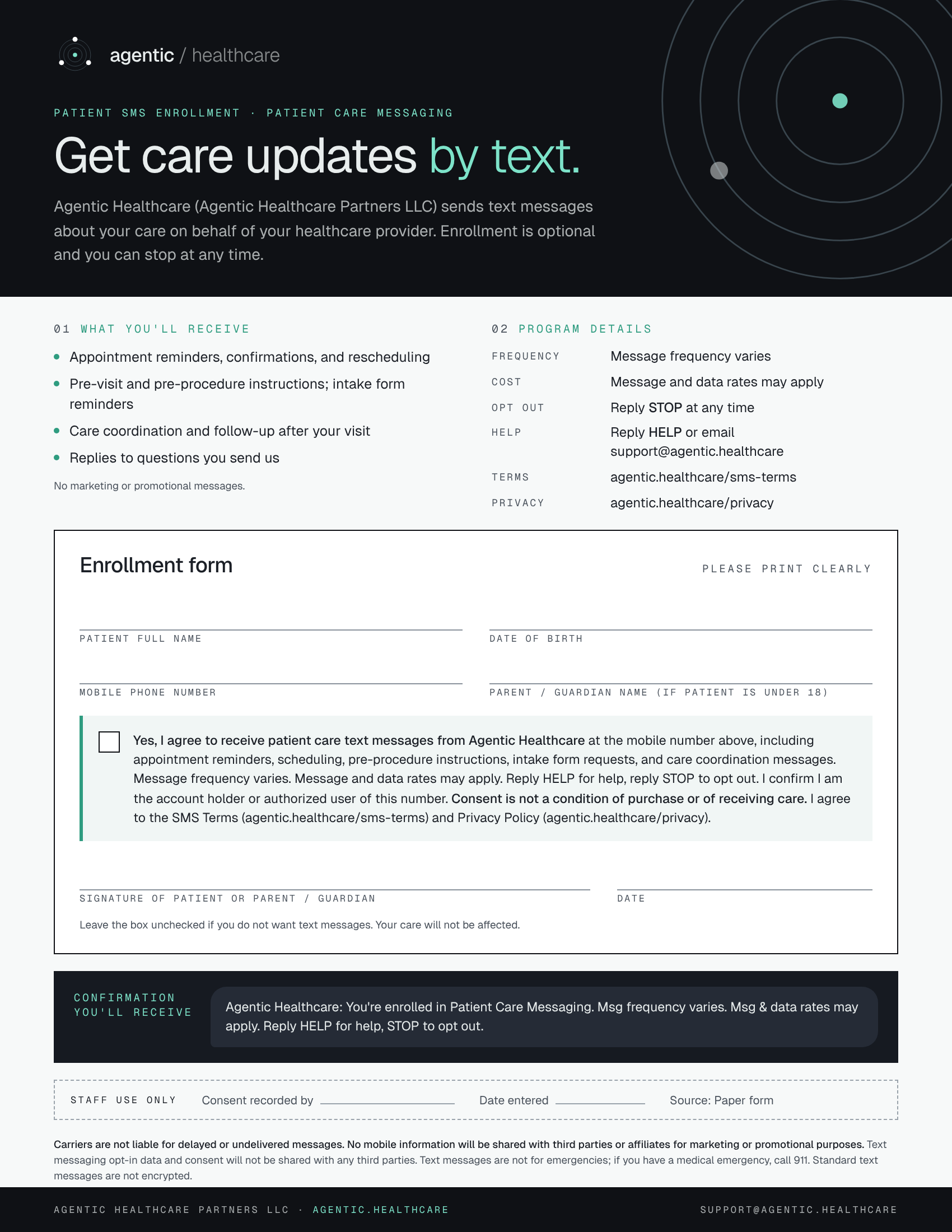
01How patients opt in
- Staff give the patient this form at check-in or intake
- The patient enters their mobile number, checks the consent box, and signs
- Staff record the consent, date, and source in the patient's record
- The patient receives a confirmation text with HELP and STOP instructions
Patients can opt out at any time by replying STOP, or get help by replying HELP. Message frequency varies. Message and data rates may apply.
02Consent language on the form
The consent box on the form reads:
Yes, I agree to receive patient care text messages from Agentic Healthcare at the mobile number above, including appointment reminders, scheduling, pre-procedure instructions, intake form requests, and care coordination messages. Message frequency varies. Message and data rates may apply. Reply HELP for help, reply STOP to opt out. I confirm I am the account holder or authorized user of this number. Consent is not a condition of purchase or of receiving care. I agree to the SMS Terms and Privacy Policy.
Patients who leave the box unchecked do not receive text messages, and their care is not affected.
03Confirmation message
After consent is recorded, the patient receives:
Agentic Healthcare: You're enrolled in Patient Care Messaging. Msg frequency varies. Msg & data rates may apply. Reply HELP for help, STOP to opt out.